
Getting admission into a university is an exciting step for every student. If you are one of the candidates who applied to Federal University, Dutsin-Ma (FUDMA), then this guide will help you understand how to use the FUDMA Admission Portal 2025, how to log in to myportal.fudutsinma.edu.ng, and how to check your admission list easily. This article is written in simple English, so even a beginner can follow it step-by-step without confusion.
What Is the FUDMA Admission Portal?
The FUDMA Admission Portal is an online platform created by the Federal University, Dutsin-Ma (FUDMA) to help students manage all their admission activities from the comfort of their homes. Instead of visiting the school in person, you can now log in to the myportal.fudutsinma.edu.ng website to:
-
Check your admission status
-
Accept or reject admission offers
-
Print your admission letter
-
Pay your school fees
-
Upload required documents
-
And even register your courses after admission
The FUDMA admission portal is user-friendly and can be accessed using your phone or computer.
Would you love to check?
Why You Need the FUDMA Admission Portal 2025
Every new student or applicant of the Federal University, Dutsin-Ma must use this portal because it is where all official admission information is posted. It is the only trusted website where you can confirm your admission list and perform all your student-related tasks safely.
Many fake websites try to copy FUDMA’s page to trick students. Always make sure the official website you visit is https://myportal.fudutsinma.edu.ng before entering your personal information.
Step-by-Step Guide on How to Login to FUDMA Admission Portal 2025
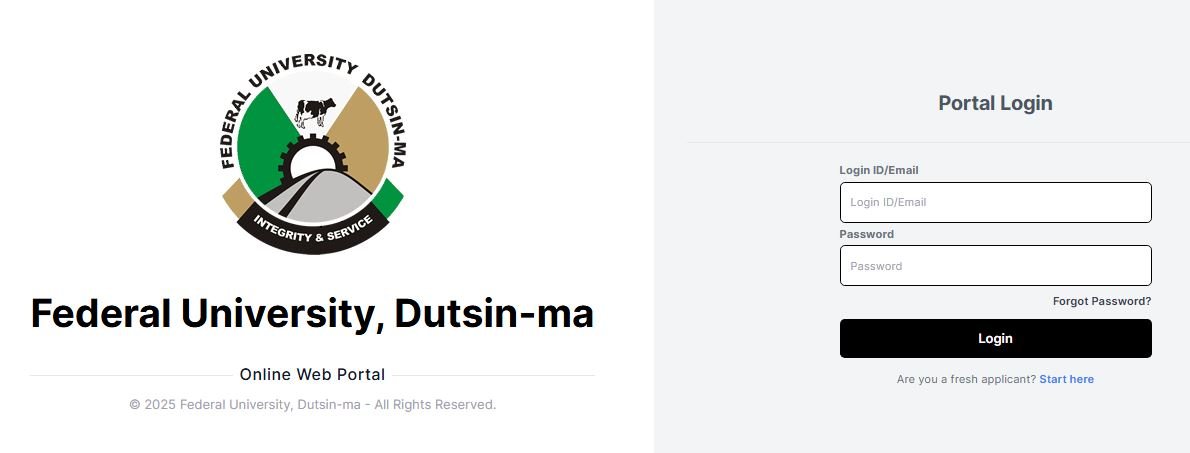
Follow the simple steps below to log in successfully:
-
Open Your Browser:
Use a reliable browser like Chrome, Opera Mini, or Safari on your phone or laptop. -
Visit the Official Portal:
Type https://myportal.fudutsinma.edu.ng in the address bar and press “Enter.” -
Go to the Login Page:
Once the homepage loads, look for the “Student Login” or “Admission Portal” option and click on it. -
Enter Your Login Details:
-
Use your JAMB Registration Number as your username.
-
Enter your password (the one you created during registration).
-
-
Click on “Login”:
After filling in the correct details, click the “Login” button to enter your dashboard. -
Access Your Admission Status:
Once logged in, you will see different options. Click on “Check Admission Status” to view if you have been admitted or not.
That’s all! Within a few seconds, you will see your FUDMA admission result displayed on the screen.
How to Check the FUDMA Admission List 2025
After the university releases the FUDMA admission list, you can check your name in two main ways:
Method 1: Through the FUDMA Admission Portal
-
Visit myportal.fudutsinma.edu.ng.
-
Log in with your details.
-
Click on “Check Admission Status.”
-
If admitted, your name and admission details will appear on the screen.
Method 2: Through the JAMB Admission Portal
-
Go to the JAMB e-facility portal at https://efacility.jamb.gov.ng.
-
Log in using your JAMB email and password.
-
Select “Check Admission Status.”
-
Enter your JAMB registration number and click “Check Admission.”
-
If FUDMA has offered you admission, you will see it there.
What to Do After Checking Your Admission Status
If you have been offered admission, congratulations! Here’s what you need to do next:
-
Accept Your Admission on JAMB CAPS:
-
Go to “CAPS.”
-
Click on “Accept Admission.”
-
Print Your Admission Letter:
Still on JAMB CAPS, click on “Print Admission Letter.” This letter will be needed during your clearance. -
Pay Your Acceptance Fee on FUDMA Portal:
Go back to myportal.fudutsinma.edu.ng, log in, and pay your acceptance fee. This confirms that you have accepted the offer officially. -
Upload Your Documents:
You’ll be asked to upload some documents, such as your birth certificate, O’level results, and admission letter. -
Complete Your Registration:
After uploading your documents, you can now pay your school fees and proceed with your course registration. -
Print All Receipts and Registration Slips:
Always keep printed copies of your payment receipts and course forms for future reference.
Common Problems and Solutions When Logging Into FUDMA Portal
Sometimes, students face small issues when trying to log into the FUDMA admission portal. Here are some common problems and how to fix them:
| Problem | Possible Solution |
|---|---|
| Wrong password | Click “Forgot Password” on the portal to reset it. |
| Website not loading | Check your internet connection or try again later. |
| “Invalid Login Details” | Make sure your JAMB number and password are correct. |
| Admission not showing | Be patient; your name might be on the next batch of the list. |
If the issue continues, you can contact the FUDMA ICT support team through the contact information available on the portal homepage.
Important Tips for Candidates
Here are some helpful tips for all FUDMA 2025 applicants:
-
Always check your email regularly for updates from FUDMA.
-
Avoid paying money to anyone promising admission.
-
Use only the official FUDMA admission portal (myportal.fudutsinma.edu.ng).
-
Keep your login details safe and private.
-
Make sure the names on all your documents match exactly.
About Federal University, Dutsin-Ma (FUDMA)
FUDMA is one of the respected federal universities in Nigeria. It is located in Dutsin-Ma, Katsina State. The university was established to give students access to quality higher education and prepare them for a successful future. FUDMA offers a wide range of undergraduate and postgraduate programs in various fields such as Science, Arts, Education, Agriculture, and Management.
The university’s vision is to produce graduates who are skillful, intelligent, and ready to solve real-life problems in society.
Other portal guides:
- AE-FUNAI Admission Status 2025/2026
- Kogi State Polytechnic Admission Portal 2025
- Kaduna Polytechnic Admission Portal 2025
Conclusion
The FUDMA Admission Portal 2025 is a very important tool for all candidates of the Federal University, Dutsin-Ma. Through the myportal.fudutsinma.edu.ng platform, students can check their admission list, pay fees, and manage all their academic activities without stress.
If you follow the simple steps shared in this article, you will be able to log in easily, check your admission status, and complete your registration successfully.

Pingback: AE-FUNAI Admission Status 2025 – FUNAI Portal / JAMB CAPS