
In this article, we will show you step by step how to reprint JAMB slip 2026 without email or profile code. The guide is very simple, and easy to understand.
This slip is what shows your examination date, time, and the center where you are going to write the exam. Many students often face challenges when trying to reprint their slip, especially if they cannot access their email or have forgotten their JAMB profile code.
If you are a student in Nigeria preparing for the Joint Admissions and Matriculation Board (JAMB) exam in 2026, one of the most important documents you will need is your JAMB slip.
Why You Need to Reprint Your JAMB Slip
Before going into the steps, let us first understand why reprinting is important. When you first register for JAMB, you get an initial registration slip. That slip only contains your personal details, the subjects you selected, and maybe a confirmation of payment. But the main JAMB exam slip is different. It carries important information like:
-
Your exam date and exact time.
-
The venue and center where you will write the exam.
-
Your seat number and other exam instructions.
Without this slip, you cannot be allowed into the exam hall. That is why JAMB always tells candidates to reprint their slip a few days before the exam.
Common Problems Students Face
A lot of students complain that they cannot reprint their JAMB slip because:
-
They no longer have access to the email they used during registration.
-
They forgot their JAMB profile code.
-
They did not save their login details.
-
They cannot remember their password to the JAMB portal.
If you fall into any of these categories, don’t worry. There are still other ways you can reprint your slip easily.
How to Reprint JAMB Slip 2026 Without Email or Profile Code
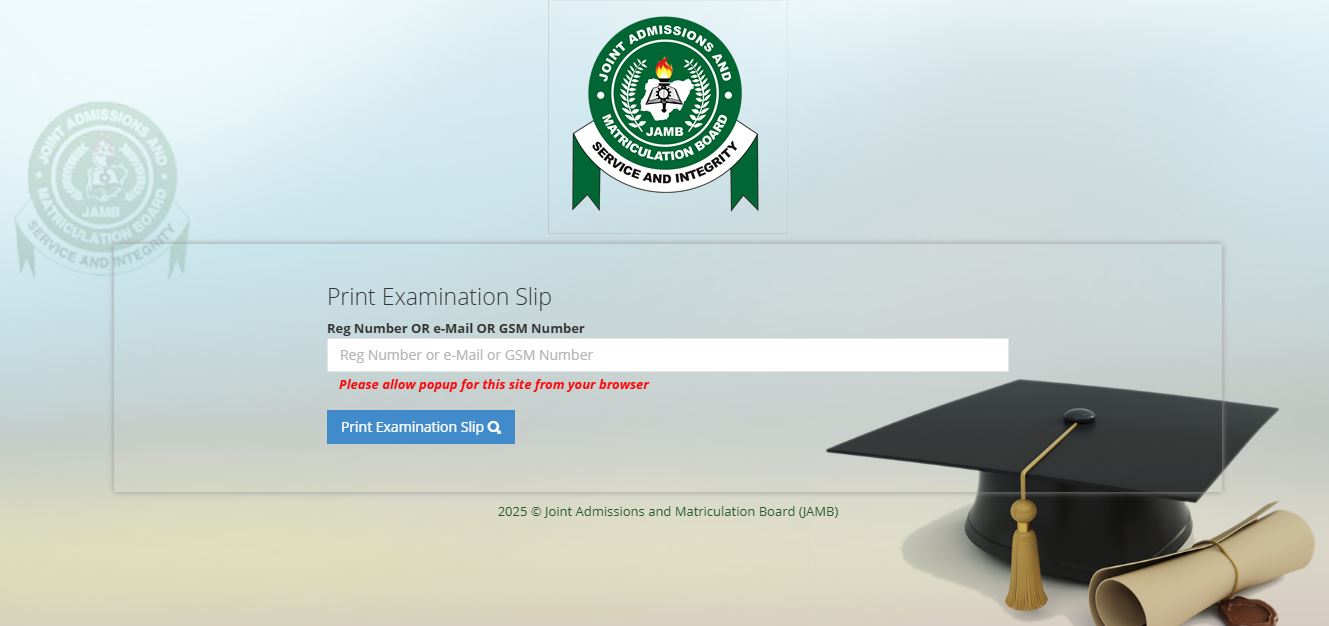
Here are the simple steps you can follow:
1. Use the JAMB Portal Directly with Registration Number
The easiest method is to use your JAMB registration number. Even if you don’t remember your email or profile code, once you have your registration number, you can still reprint.
Steps:
-
Go to the official JAMB slip printing portal.
-
On the homepage, look for “Print Examination Slip.”
-
Enter your JAMB registration number in the box provided.
-
Click on “Print Slip.”
-
Your slip will appear on the screen. You can now download and print it.
This method works well if you still have your registration number.
2. Visit a JAMB Accredited CBT Centre
If you don’t have your email, profile code, or even your registration number, another safe option is to go to the nearest JAMB-accredited CBT (Computer Based Test) centre.
What to do:
-
Take your full name and date of birth to the center.
-
Tell the staff that you want to reprint your slip but do not have your email or profile code.
-
They can easily check your record in the JAMB system and print out your slip for you.
This method is very reliable because CBT centres are officially approved by JAMB.
3. Use the JAMB e-Facility Portal with Phone Number
Sometimes, JAMB allows you to log in with your phone number that was used during registration.
Steps:
-
Instead of email, type in your registered phone number.
-
Enter your password (if you remember it).
-
From the dashboard, click on “Print Examination Slip.”
If you do not remember the password, you can reset it using your phone number.
4. Use SMS Option (If Activated for 2026)
In some previous JAMB years, candidates were able to get their exam slip details by sending an SMS. If JAMB activates this feature again for 2026, here is how it works:
-
Open your SMS app.
-
Type “PRINT” followed by your JAMB registration number.
-
Send the message to 55019 (the official JAMB shortcode).
-
You will receive an SMS with your exam details.
Note: This method usually costs ₦50 per SMS, so make sure you have airtime on your phone.
5. Ask JAMB Support for Help
If you are still unable to reprint using the above methods, you can contact JAMB directly.
Ways to reach JAMB:
-
Visit any JAMB office in your state.
-
Call the JAMB support line (available on their website).
-
Use the JAMB support ticket system on their portal.
Make sure you provide your full name, date of birth, and the phone number you used during registration. They will help you retrieve your slip.
Tips to Avoid Issues Next Time
To save yourself stress in the future, here are some simple tips:
-
Always write down your JAMB registration number in a safe place.
-
Save your JAMB email and password on your phone or a notebook.
-
Use an email you can always access.
-
Print and photocopy your slip early, not at the last minute.
These little steps can prevent panic when the exam is close.
Did you check this?
- How to Accept Admission on JAMB CAPS 2026 With Your Phone
- JAMB 2026 Change of Institution Deadline: Step-by-Step Guide
- Post UTME 2026 Registration Form: Step-by-Step Guide
Conclusion
Now you know how to Reprint JAMB Slip 2026 Without Email or profile code. Reprinting your JAMB slip is very important because it tells you exactly where and when you will write your exam. Many students worry when they cannot access their email or remember their profile code, but as you have seen in this guide, there are still simple ways to get it done.
You can reprint your JAMB slip 2026 without email or profile code by using your registration number on the JAMB portal, visiting an accredited CBT center, logging in with your phone number, using the SMS option (if available), or contacting JAMB support.
Always remember to print at least two copies of your slip: one to take to the exam hall and one to keep safe at home. With the steps explained above, you don’t have to worry anymore. Just follow them, and you will be ready for your JAMB exam in 2026.

Pingback: JAMB Approved CBT Centres in Kaduna State 2026 (Full List)
Pingback: How to Create JAMB Profile 2026 Step by Step (Best Guide)
Pingback: WAEC 2026 Timetable for Science Students PDF Download
Pingback: WAEC 2026 Timetable for Art Students PDF Download
Pingback: NECO 2026 Timetable PDF Download [Official & Free]
Pingback: How to Check Hostel Allocation on School Portal 2026