
How to Accept GSU Admission on JAMB CAPS 2025 is something every newly admitted student of Gombe State University must understand clearly. After checking your name on the GSU admission list, the next step is to visit the Joint Admissions and Matriculation Board (JAMB) Central Admissions Processing System (CAPS) to officially confirm your offer. Without this acceptance, your admission will not be recognized, even if GSU has already listed you as admitted.
The CAPS portal is where all candidates can either accept or reject an admission, and it plays a big role in making sure the process is transparent and fair. For GSU, it also helps the school finalize its list of students for the 2025/2026 academic session.
In this guide, we will take you through the step-by-step process of how to accept GSU admission on JAMB CAPS, highlight common mistakes to avoid, and explain why acting quickly is important since screening ends today.
What Is JAMB CAPS & Why Accepting on CAPS Is Critical
-
CAPS (Central Admissions Processing System) is the official JAMB portal for managing all undergraduate admission offers.
-
Once your name appears on GSU’s admission list via JAMB CAPS, you need to formally accept that offer on CAPS. Otherwise, you risk losing the place.
-
Accepting is not optional — without doing so, GSU (or any other university) cannot move forward with your admission, matriculation, or screening.
Key Things to Check Before You Accept GSU Admission on JAMB CAPS 2025
Before you hit “Accept,” make sure:
-
Your course and institution are correct — Confirm GSU is offering you the course you applied for or are qualified for.
-
Your O-Level results are uploaded and verified — If you had marked “Awaiting Result” or haven’t yet submitted your WAEC/NECO (or equivalent) scores, upload them now. Without proper O-Level verification, acceptance might be disallowed or delayed.
-
You meet the GSU cut-off mark & UTME requirements — Check GSU’s published cut-off marks for your faculty / course. If your UTME score falls below, you may need to apply for a change of course or institution.
-
Your login credentials are working — You’ll need your JAMB registration number, password, and access to the same email/phone number you used for registration.
-
You are aware of the deadline — Since you’ve noted screening closes today, every minute counts. Don’t wait.
Step-by-Step Guide: How to Accept GSU Admission on JAMB CAPS 2025
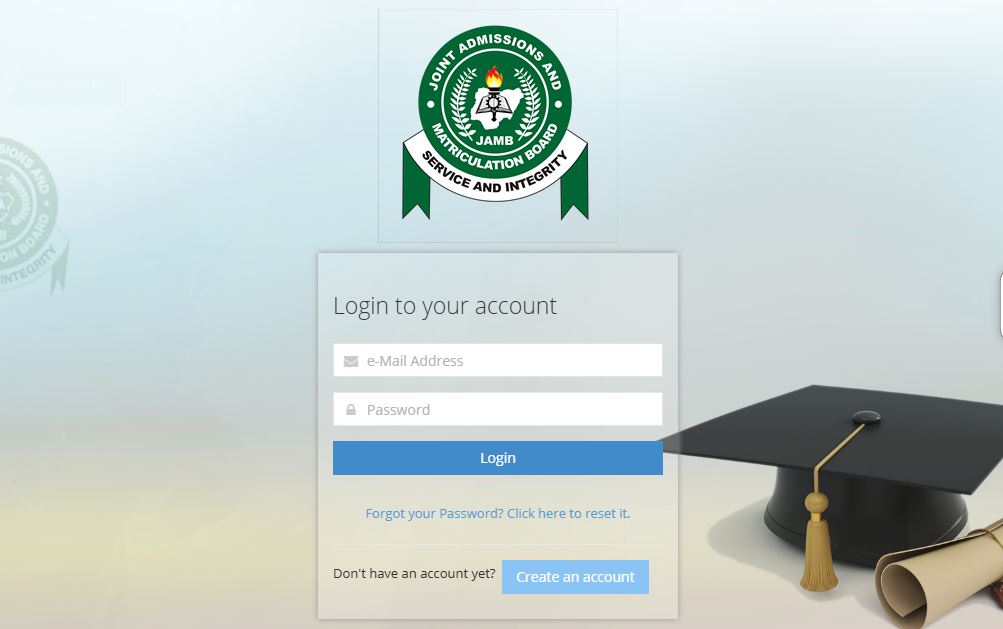
If your name has appeared on the GSU admission list, the next thing you must do is confirm it on JAMB CAPS. Follow these steps carefully:
-
Visit the JAMB e-Facility Portal
Go to https://efacility.jamb.gov.ng on your phone or computer browser. -
Log in with your JAMB details
Enter the email address and password you used during JAMB registration, then click Login. -
Locate the CAPS option
On your dashboard, scroll to the left-hand side and click Check Admission Status. Next, select Access CAPS. -
View your admission status
Inside CAPS, you’ll see your details, including your chosen course and institution. If Gombe State University has offered you admission, it will display here. -
Accept the admission
Click the Accept button to confirm. Once done, the button will turn green, showing that you have successfully accepted your admission. -
Print your admission letter
After accepting, return to the main dashboard and print your JAMB Admission Letter. This document will be required during GSU’s screening and registration process.
Tip: If you don’t see any offer yet, keep checking CAPS regularly because JAMB and GSU update admissions in batches.
Alternate Method via SMS (If Available)
In addition to the JAMB CAPS portal, candidates may also accept or reject their admission using SMS. This option is valid for the 2025/2026 admission session but only works if you use the phone number linked to your JAMB profile.
-
To accept your admission, send ACCEPT to 55019 or 66019.
-
To reject an admission, send REJECT to the same shortcode.
-
You will receive a confirmation message from JAMB once your request has been processed.
Please note that not all candidates may successfully use the SMS method. If you encounter any issues, always return to the JAMB CAPS portal via the e-facility website to complete the admission acceptance process. The CAPS portal remains the most reliable option.
What Happens After Acceptance
Once you accept the admission on CAPS:
-
JAMB updates your admission status to “Accepted” for GSU.
-
Other offers (if any) are generally void once you’ve accepted a specific institution + course.
-
You must print your JAMB Admission Letter from CAPS / JAMB portal. This is needed for GSU’s screening and registration processes.
-
Complete GSU’s screening or clearance procedures: bring required documents, pay any acceptance or screening fees, verify your credentials. Since screening closes today, try to attend immediately or contact GSU admission office.
What If You Don’t Accept the Admission Offer
-
If you don’t accept the admission offer, your admission offer may expire. GSU may withdraw it and allocate the place to someone else.
-
If your O-Level results are not yet verified, your acceptance may be invalid.
-
Once the deadline passes, even if you somehow accept later, GSU could refuse to proceed with matriculation.
Mistakes to Avoid While Trying to Accept GSU Admission on JAMB CAPS 2025
-
Trying to accept with wrong credentials (wrong phone/email)—you may not receive confirmations.
-
Accepting a course you don’t want because later changes are difficult.
-
Ignoring the need to upload documents (this can block or revoke admission).
-
Relying on outdated information—always use the current JAMB CAPS portal (2025 version).
Quick-Checklist: Accept Admission Today (Action Plan)
-
Log in to JAMB e-Facility immediately.
-
Check CAPS to see if GSU admission offer is visible.
-
If visible, accept admission right away.
-
Confirm status: screenshot or save confirmation.
-
Print admission letters (JAMB & GSU).
-
Complete GSU screening / clearance today (if possible).
-
Pay any fees required (acceptance, screening) before the deadline.
FAQ Concerning How to Accept GSU Admission on JAMB CAPS 2025
| Question | Answer |
|---|---|
| Can I accept a different institution later after accepting GSU? | Usually no — once you accept an offer on JAMB CAPS, you’re locked in. Changing requires special permission, if possible at all. |
| What if GSU offered me a different course than I applied for? | You may reject the offer and try “Change of Course / Change of Institution” via CAPS, if your UTME score and JAMB policy allow it. |
| Is there any fee for accepting admission? | JAMB itself does not charge to accept via CAPS. GSU may require an acceptance fee during screening or registration—check their notifications. |
| What if I accepted, but screening documents are missing or wrong? | That could delay matriculation or disqualify you. Always verify O-Level, identity, and other required documents. |
Did you check this?
- GSU Admission 2025/2026: Departmental Shortlisting
- GSU Admission List 2025/2026: Check Portal & CAPS
Conclusion
Accepting your admission offer on JAMB CAPS 2025 is the most important step to officially secure your place at Gombe State University (GSU). If you have seen your name on the GSU admission list, log in to the CAPS portal immediately, verify your details, and click accept GSU admission before the screening deadline closes. Always confirm your O’Level uploads, print your JAMB admission letter, and follow GSU’s screening instructions without delay. By completing the CAPS admission acceptance process quickly, you protect your admission status and officially become a part of GSU’s 2025 academic session.
Portal Guide Nigeria is a student hub where you get access to real and correct school news updates. Learn about us through our About Us page.

Pingback: GSU Acceptance Fee 2025/2026 | Check Here (Just Updated)
Pingback: GSU Admission Letter 2025/2026: How to Print Online (CHECK)